
Two server processors. Same 32 cores. One costs three times the other. If you have ever stared at an AMD price list and wondered what you are actually paying for, this guide is for you.
The answer is not marketing. It comes down to three things: how much memory the chip can talk to at once, how many devices you can plug into it, and how long it is guaranteed to stay on the market. Almost everything else follows from those three.
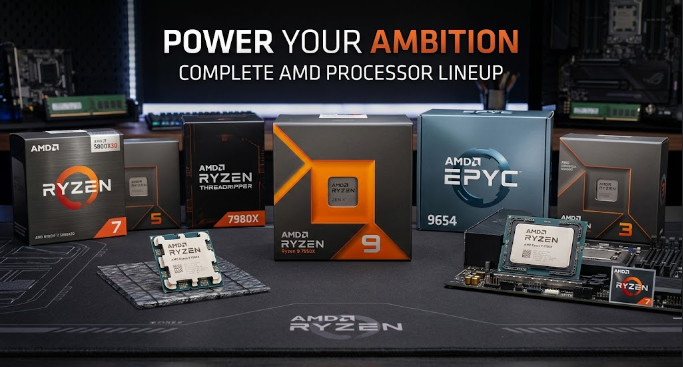
Three families, three jobs
Think of it like vehicles. A family car, a pickup truck and a semi-trailer all have engines and four wheels, but nobody buys one to do the other’s job. AMD’s lineup works exactly the same way, and knowing which one you are looking at saves money immediately.
Ryzen – the family car
Ryzen covers everyday desktops, office machines, single-user CAD seats and home labs. Within the family there are four tiers:
- Ryzen 3 – four cores. Office PCs and light multitasking.
- Ryzen 5 – six cores. The mainstream sweet spot for most home and business desktops.
- Ryzen 7 – eight cores. Content creation, compiling, heavier multitasking.
- Ryzen 9 – twelve to sixteen cores. The top of the consumer line, a cut-down workstation.
Two suffixes are worth recognising. A 3D suffix (as in Ryzen 7 7800X3D) means AMD stacked extra cache on top of the processor – it is dramatically faster in simulation and gaming, but slower in pure rendering than a same-tier part without it. A G suffix means the chip has integrated graphics, which matters for office machines that ship without a graphics card.
What Ryzen cannot do is feed a rack of workloads. It has two memory channels. Try to run thirty virtual machines on it and you will run out of memory bandwidth long before you run out of cores.
Ryzen Threadripper – the pickup truck
Threadripper is the workstation tier, sitting between a desktop and a server. It has two distinct lines: plain Threadripper for freelance and small-studio workstations, and Threadripper PRO for corporate fleets – the PRO adds eight memory channels, full ECC support and remote management.
The distinguishing feature is PCIe lane count. If your work involves four GPUs, a dozen NVMe drives, or a capture card alongside both, Threadripper is where that conversation starts. Typical workloads: rendering farms, simulation, multi-GPU AI development, video post-production, and engineering workstations that need registered ECC memory but will never go into a rack.
EPYC – the semi-trailer
EPYC is the data center family, and it is what enterprise buyers are almost always actually shopping for. It is not one product but a set of lines, each aimed at a different shape of deployment:
- EPYC 9005 series (Turin) – the current flagship. Zen 5 architecture, up to 128 cores in the standard version and 192 cores in the “Dense” variant. Twelve channels of DDR5, 128 lanes of PCIe Gen 5.
- EPYC 9004 series (Genoa) – the previous generation and still the volume seller for new deployments. Zen 4, up to 96 cores. Same SP5 socket as Turin, which means the same boards can take both.
- EPYC 8004 series (Siena) – single-socket parts for edge sites and telco cabinets, where power and space are tight. TDP starts as low as 70 watts.
- EPYC 4004 series – entry-level server chips on the mainstream AM5 socket, for small business servers and dedicated hosting where a full SP5 platform is overkill.
There are also speciality variants. Any part ending in X (such as the 9684X) carries stacked 3D cache for cache-hungry databases and EDA work. Parts in the “Dense” line use efficiency-tuned Zen 5c cores, trading a little clock speed for far more cores per socket – which is exactly what cloud and container hosts want.
Ten years of EPYC: from 32 cores to 256
AMD names every EPYC generation after an Italian city, which makes the history easy to remember. The table below is the whole story in one view.
| Generation | Year | Codename | Series | Max cores | Architecture | Socket | Memory |
|---|---|---|---|---|---|---|---|
| 1st | 2017 | Naples | 7001 | 32 | Zen | SP3 | DDR4, 8-channel |
| 2nd | 2019 | Rome | 7002 | 64 | Zen 2 | SP3 | DDR4, 8-channel |
| 3rd | 2021 | Milan | 7003 | 64 | Zen 3 | SP3 | DDR4, 8-channel |
| 3rd | 2022 | Milan-X | 7004 | 64 | Zen 3 + 3D cache | SP3 | DDR4, 8-channel |
| 4th | 2022 | Genoa | 9004 | 96 | Zen 4 | SP5 | DDR5, 12-channel |
| 4th | 2023 | Genoa-X | 9004 | 96 | Zen 4 + 3D cache | SP5 | DDR5, 12-channel |
| 4th | 2023 | Bergamo | 9004 | 128 | Zen 4c | SP5 | DDR5, 12-channel |
| 4th | 2023 | Siena | 8004 | 64 | Zen 4c | SP6 | DDR5, 6-channel |
| 5th | 2024 | Turin | 9005 | 128 | Zen 5 | SP5 | DDR5, 12-channel |
| 5th | 2024 | Turin Dense | 9005 | 192 | Zen 5c | SP5 | DDR5, 12-channel |
| 6th | 2026 | Venice | 9006 | 96 | Zen 6 | SP7 | DDR5, 16-channel |
| 6th | 2026 | Venice Dense | 9006 | 256 | Zen 6c | SP7 | DDR5, 16-channel |
Three turning points are worth remembering. Rome (2019) was where AMD went from curiosity to genuine contender – 64 cores and PCIe Gen 4 when the competition was still on Gen 3. Genoa (2022) moved the whole platform to DDR5 and twelve memory channels, which is the architecture buyers are working with today. And Turin (2024) pushed density past 190 cores per socket, at which point the constraint moved from the processor to the software license and the cooling budget.
The sixth generation, Venice (EPYC 9006), launched in July 2026 with up to 256 cores and a new SP7 socket carrying sixteen channels of DDR5 and PCIe Gen 6. Flagship SP7 systems ship from the fourth quarter of 2026, so greenfield builds can plan around it now – but the practical guidance for most buyers today is otherwise unchanged: EPYC 9004 and 9005 share the SP5 socket, so a board bought for one will accept the other. That is your upgrade path.
What EPYC actually gives you
Six things separate a server processor from a desktop one. In rough order of how often they decide a purchase:
1. Core density you cannot get elsewhere. A single socket now holds up to 192 cores. One 2U server can replace several older machines, which cuts rack space, cabling, switch ports and power circuits at the same time.
2. Memory capacity and bandwidth. Twelve channels of DDR5, supporting several terabytes per socket. Database and in-memory workloads live or die on this, and it is the difference buyers most often underestimate.
3. Enough PCIe lanes to fill the chassis. 128 lanes of Gen 5 means every GPU, network card and NVMe drive gets a full-width connection instead of sharing. On a desktop platform, adding a third GPU usually means halving the bandwidth of the first two.
4. Security built into the silicon. AMD’s SEV encrypts each virtual machine’s memory separately, so a compromised hypervisor cannot read a tenant’s data. For anyone hosting other people’s workloads, this is often a hard requirement rather than a nice-to-have.
5. Performance per watt. Modern EPYC parts deliver substantially more throughput for the same power draw than the generation they replace. In a data center, electricity and cooling are recurring costs – and this is where they get decided.
6. Single-socket economics. Because one EPYC socket holds what used to take two, many deployments skip the second processor entirely. That removes a chip, a heatsink, and in many cases a software license.
Why twelve memory channels matters more than core count
This is the part most buyers get wrong, and it is worth two minutes of your time.
Picture a motorway. Cores are the cars. Memory channels are the lanes. You can build the fastest cars in the world, but if you only give them four lanes, they will spend most of their time sitting in traffic.
A desktop processor has two lanes. A server processor has twelve. That is why a 32-core EPYC can comfortably outperform a 64-core desktop chip on a database workload – the server chip is not waiting for data.
The practical consequence is easy to overlook. If you populate only half the channels, you halve the bandwidth and waste a large part of what you paid for. Twelve channels want twelve modules, and they should match. Buyers who economise here often find their new server is barely faster than the one it replaced – and blame the processor.
Chiplets: why AMD can keep adding cores
There is a reason AMD reached core counts that would have been unthinkable a decade ago, and the idea behind it is refreshingly simple.
Instead of building one giant processor and scrapping the whole thing when a single component fails during manufacturing, AMD builds small identical pieces – chiplets – and connects them. Think Lego rather than sculpture.
Small pieces are cheap to produce because a defect ruins one brick, not the entire model. Once the bricks exist, you can stack eight of them for a server or two for a desktop, from the same production line. That is how a data center chip ends up with more cores than most software can even use – and it is why AMD could move from 32 cores in 2017 to 192 in 2024 while the underlying manufacturing process changed far less.
Reading an EPYC part number
Once you know the pattern, the numbers stop looking random.
| Part of the number | What it tells you | Example |
|---|---|---|
| Leading 9 | Data center family | 9xxx |
| Second digit | Generation | 9554 is 4th gen, 9655 is 5th gen |
| Final two digits | Position within the generation | Higher generally means more cores |
| Suffix F | Tuned for clock speed | 9654F |
| Suffix P | Built for single-socket servers | 9654P |
| Suffix X | Carries stacked 3D cache | 9684X |
| 8xxx series | Single-socket edge parts | 8004 family |
Two things follow. A bigger number is not automatically the better buy – a frequency-tuned part wins on database work where per-core speed matters, while a Dense part wins when you are packing in virtual machines. And the P suffix only pays off in a single-socket build; in a dual-socket server it simply limits you without any benefit.
Four questions that decide the purchase
Forget the spec sheet for a moment. Answer these instead.
1. How many things will run on this machine at once?
Many small workloads favor core density. One heavy workload favours clock speed and cache.
2. Does the software charge per core?
Database and virtualization licenses often do. This can flip the economics entirely – a cheaper chip with fewer cores may cost more in licenses over three years than the expensive one.
3. What has to be fed?
Count the GPUs, network cards and drives, then confirm the platform has the lanes and channels to keep them all busy.
4. How long will this platform live?
If you are rolling out across many sites, part-number continuity matters more than a few percent of benchmark performance. Staying within one socket family keeps your options open.
What to confirm before you order
These are the details that stall a purchase after the part number has been agreed.
- Socket and BIOS revision. A processor can fit the socket and still need a firmware update before it will POST.
- Memory configuration. Match module count to channel count, and check the modules are on the vendor’s validated list.
- Cooling and power. High-core parts draw serious wattage – some reach 400 watts or more. Confirm the heatsink and chassis are rated for it.
- Condition and warranty. Factory sealed, factory recertified, or tested clean pulls – all three are legitimate, at different prices and warranty positions.
- Supply continuity. Never standardize on a single part number without confirming an alternative exists.
The short version
Ryzen for one person, Threadripper for one powerful workstation, EPYC for everything that lives in a rack. Inside EPYC, choose the 9004 or 9005 series for mainstream servers, 8004 for edge cabinets, and the X variants when your workload is cache-hungry rather than core-hungry.
Then decide on three questions: how many things run at once, whether licenses charge per core, and how many devices need feeding. Not on which number is biggest.
And whatever you choose – fill all the memory channels. It is the cheapest performance you will ever buy.
Prefer to browse first? Start from our server processor catalog.